pkgsrc (4/6)
This post is an automatic translation from French. You can read the original version here.
Welcome back to this blog and to my notes on Imil’s videos. Ready for this new chapter? After our little role-playing game in the previous episodes, we will now tackle packaging a real Python application under his distinguished guidance. As always, you can watch the video [here]
Well… here… here… As soon as it becomes available on YouTube! ^^’
Our goal? Archey 4
There are all sorts of little programs out there that let you proudly display your system to your friends. After all, we spend long hours fine-tuning everything, so we might as well show it off with class, right? Among these tools, we can mention the two most common ones: neofetch and screenfetch.
Here is a little example:
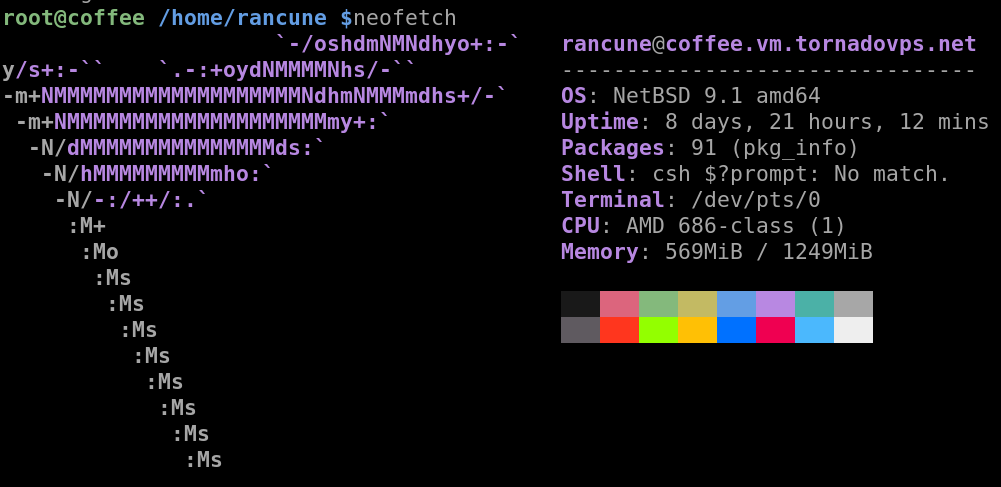 (Hmm? My shell display is broken… I’ll need to look into why!)
The application we are going to start packaging today is another one of these tools, and a fairly complete one:
It is archey4, which is available on Github
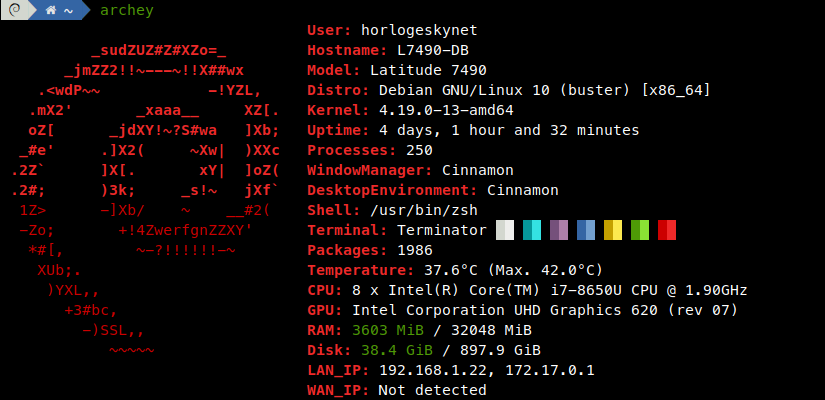
(Source: project’s Github)
As you can see, the application displays some specific information: temperature, IP, etc.
But – and this will be an opportunity to learn how pkgsrc handles it – it is written in Python.
Preparing our package:
Since we are not (yet) authorized to directly create official FreeBSD packages, we will use pkgsrc-wip as explained in the previous episodes.
What? You don’t know what wip is??? Go read episode 1!
Fine, I’ll re-explain in a few words, but don’t let me catch you asking again! Wip is a repository that allows people to create packages and make them available to everyone. Access is “simpler” in the sense that you just need to prove yourself to Thomas Klausner to gain access and publish your package.
Before diving into a package, it is good practice to check that it doesn’t already exist! This avoids unnecessary work and frustration. So we start by searching with pkgfind:
$ pkgfind archeyNo results? Perfect. Let’s go!
As last time, we will start by installing wip via git, and creating the folder for our package:
$ cd /usr/pkgsrc

$ git clone --depth 1 git://wip.pkgsrc.org/pkgsrc-wip.git wip
Cloning into 'wip'...
remote: Enumerating objects: 44337, done.
remote: Counting objects: 100% (44337/44337), done.
remote: Compressing objects: 100% (38947/38947), done.
remote: Total 44337 (delta 3991), reused 30831 (delta 3407), pack-reused 0
Receiving objects: 100% (44337/44337), 26.86 MiB | 375.00 KiB/s, done.
Resolving deltas: 100% (3991/3991), done.
Updating files: 100% (36802/36802), done.

$ mkdir wip/archey4
A small precision here: we consider the package name to be archey4… meaning the digit “4” is part of the package name! It is not a version number, otherwise we would not have put it in the directory name.
And, just like the previous times, we use url2pkg to create our project template:
$ cd /usr/pkgsrc/wip/archey4

$ url2pkg https://github.com/HorlogeSkynet/archey4/archive/refs/tags/v4.13.4.zip
===> Cleaning for archey4-4.13.4
=> Bootstrap dependency digest>=20211023: found digest-20220214
WARNING: [license.mk] Every package should define a LICENSE.
=> Fetching archey4-4.13.4.zip
Requesting https://github.com/HorlogeSkynet/archey4/archive/refs/tags/v4.13.4.zip
Redirected to https://codeload.github.com/HorlogeSkynet/archey4/zip/refs/tags/v4.13.4
Requesting https://codeload.github.com/HorlogeSkynet/archey4/zip/refs/tags/v4.13.4
   156 KiB    1.38 MiB/s
160197 bytes retrieved in 00:00 (1.38 MiB/s)
=> Checksum BLAKE2s OK for archey4-4.13.4.zip
=> Checksum SHA512 OK for archey4-4.13.4.zip
===> Installing dependencies for archey4-4.13.4
=> Tool dependency cwrappers>=20150314: found cwrappers-20220403
=> Tool dependency checkperms>=1.1: found checkperms-1.12
===> Skipping vulnerability checks.
WARNING: No /var/db/pkg/pkg-vulnerabilities file found.
WARNING: To fix run: `/usr/pkg/sbin/pkg_admin -K /var/db/pkg fetch-pkg-vulnerabilities'.
===> Overriding tools for archey4-4.13.4
===> Extracting for archey4-4.13.4

Remember to run pkglint when you're done.
See ../../doc/pkgsrc.txt to get some help.
One important thing at this point. When packaging software, you generally never base your work on the “main” or “master” branch. And for good reason: it changes far too often! You base it on identifiable versions: here, tags in the case of Github.
Let’s see what the Makefile generated by url2pkg looks like:
# $NetBSD$

GITHUB_TAG=     refs/tags/v${PKGVERSION_NOREV}
DISTNAME=       archey4-4.13.4
PKGNAME=        ${PYPKGPREFIX}-${DISTNAME}
CATEGORIES=     python # TODO: add primary category
MASTER_SITES=   ${MASTER_SITE_GITHUB:=HorlogeSkynet/}
EXTRACT_SUFX=   .zip

MAINTAINER=     INSERT_YOUR_MAIL_ADDRESS_HERE # or use pkgsrc-users@NetBSD.org
HOMEPAGE=       https://github.com/HorlogeSkynet/archey4
COMMENT=        Archey is a simple system information tool written in Python
#LICENSE=       GPLv3 # TODO: from setup.py; needs to be adjusted

DEPENDS+=       # TODO: distro~=1.3>=0
DEPENDS+=       # TODO: netifaces~=0.10>=0

USE_LANGUAGES=  # none

.include "../../lang/python/egg.mk"
.include "../../mk/bsd.pkg.mk"
This Makefile is slightly different from the one we got when we were packaging the now-famous truefalse.
First, we can note that pkgsrc detected on its own that we were packaging a Python application, and adapted accordingly. This is remarkably well done: it read the software’s setup.py and automatically filled in certain fields, such as the license (LICENSE) or the dependencies.
Furthermore, pkgsrc also took into account the fact that this URL pointed to the Github website. Since it is a “well-known” site, pkgsrc uses specific variables for this case such as MASTER_SITE_GITHUB. That’s pretty smart!
We fill in the simple fields right away: CATEGORIES, MAINTAINER, HOMEPAGE, LICENSE… nothing revolutionary for now. To be frank, this is one of the things I really appreciate about this tool that I’m discovering along with you: everything seems well thought-out, well integrated, and it greatly reduces our difficulties!
Quick reminder: for licenses, you can find the list in “/usr/pkgsrc/mk/licences.mk”. Don’t put just anything! It’s standardized!
Here is what our Makefile now looks like:
# $NetBSD$

GITHUB_TAG=     refs/tags/v${PKGVERSION_NOREV}
DISTNAME=       archey4-4.13.4
PKGNAME=        ${PYPKGPREFIX}-${DISTNAME}
CATEGORIES=     sysutils
MASTER_SITES=   ${MASTER_SITE_GITHUB:=HorlogeSkynet/}
EXTRACT_SUFX=   .zip

MAINTAINER=     maintainer@rancune.org
HOMEPAGE=       https://github.com/HorlogeSkynet/archey4
COMMENT=        Archey is a simple system information tool written in Python
LICENSE=        gnu-gpl-v3

DEPENDS+=       # TODO: distro~=1.3>=0
DEPENDS+=       # TODO: netifaces~=0.10>=0

USE_LANGUAGES=  # none

.include "../../lang/python/egg.mk"
.include "../../mk/bsd.pkg.mk"
Fetching packages, when you do a make fetch, is done by default from the string:
${DISTNAME}${EXTRACT_SUFX}By default, the suffix is “.tar.gz”: once again, pkgsrc did a great job!
Let’s now focus more specifically on the “Python” aspects of things…
Managing Python packages under pkgsrc
Handling Python versions
Pkgsrc allows different versions of Python to coexist in our OS, and therefore different versions of the same software for each of these versions.
This is achieved through the package name (PKGNAME) composed as follows:
PKGNAME= ${PYPKGPREFIX}-${DISTNAME}If, for example, we have Python versions 2.7, 3.2 and 3.9 available, this package could be installed as:
- py27-archey4
- py32-archey4
- py39-archey4
And this will of course apply to all required dependencies!
For things to be done correctly, we will rename our directory and follow the convention:
$ cd /usr/pkgsrc/wip
$ mv archey4 py-archey4
There we go! Better, right?
Package dependencies
Let’s focus more specifically on our package’s dependencies. They are present in the following two lines of the Makefile and were extracted from setup.py:
DEPENDS+=       # TODO: distro~=1.3>=0
DEPENDS+=       # TODO: netifaces~=0.10>=0
First things first, we check that these Python packages already exist in pkgsrc, otherwise we would need to package them too! (Can you feel the nightmare coming???)
With slightly trembling hands, we use pkgfind:
$ pkgfind py-distro
devel/py-distro: OS platform information API

$ pkgfind py-netifaces
net/py-netifaces: Portable access to network interfaces from Python
Good, this time everything will be fine! That said, if that hadn’t been the case, it wouldn’t have been a disaster… just a bit more work!
We can therefore modify our Makefile one last time to add the dependencies:
DEPENDS+=	${PYPKGPREFIX}-distro>=1.3:../../devel/py-distro
DEPENDS+=	${PYPKGPREFIX}-netifaces>=0.10:../../net/py-netifaces
It’s pretty wonderful to think that we don’t need to manage Python versions ourselves, isn’t it?
Finishing touches
Two last things before we launch. The first concerns this line:
USE_LANGUAGES= # noneThis variable usually specifies which compiler should be used for a package. The choices are:
	c99, c++, c++03, gnu++03, c++0x, gnu++0x, c++11, gnu++11,
	c++14, gnu++14, c++17, gnu++17, c++20, gnu++20, fortran,
	fortran77, java, objc, obj-c++, and ada.
Here, we don’t need any! We remove the line!
The second thing concerns the includes used at the end of the Makefile. When a project uses setup.py (the setup-tools and “eggs”), we include egg.mk as indicated in the pkgsrc documentation. As you can see, url2pkg has already done this for us.
But we can also include ../../lang/python/application.mk!
Since it is fairly short, here is its content:
# $NetBSD: application.mk,v 1.13 2020/03/24 04:40:34 rillig Exp $
#
# Replace the #! interpreter for Python scripts.
#
# This mk fragment should be included in all python packages that
# install python scripts, or at least those that don't use setuptools
# or some other mechanism to set the real path.  Specifically, it is
# reasonable to include both egg.mk and application.mk.
#
# Package-settable variables:
#
# REPLACE_PYTHON
#       A list of filename patterns for Python scripts to be installed,
#       relative to ${WRKSRC}.
#
# Keywords: python
#

.include "../../lang/python/pyversion.mk"

.if defined(REPLACE_PYTHON)
REPLACE_INTERPRETER+=   python
REPLACE.python.old=     .*python3\{0,1\}[^ ]*
REPLACE.python.new=     ${PYTHONBIN}
REPLACE_FILES.python=   ${REPLACE_PYTHON}
.endif
This little file replaces the path to the interpreter in all Python files (probably hardcoded ^^’).
I must admit, this blew me away. It’s really, really well designed!!!
Here we go!!!
It is now time to take the plunge. The current version of our Makefile is:
# $NetBSD$

GITHUB_TAG=     refs/tags/v${PKGVERSION_NOREV}
DISTNAME=       archey4-4.13.4
PKGNAME=        ${PYPKGPREFIX}-${DISTNAME}
CATEGORIES=     sysutils
MASTER_SITES=   ${MASTER_SITE_GITHUB:=HorlogeSkynet/}
EXTRACT_SUFX=   .zip

MAINTAINER=     maintainer@rancune.org
HOMEPAGE=       https://github.com/HorlogeSkynet/archey4
COMMENT=        Archey is a simple system information tool written in Python
LICENSE=        gnu-gpl-v3

DEPENDS+=       ${PYPKGPREFIX}-distro>=1.3:../../devel/py-distro
DEPENDS+=       ${PYPKGPREFIX}-netifaces>=0.10:../../net/py-netifaces

.include "../../lang/python/egg.mk"
.include "../../lang/python/application.mk"
.include "../../mk/bsd.pkg.mk"
We start by making sure everything is clean: you never know.
$ make clean
===> Cleaning for py39-archey4-4.13.4
The Python version is correctly indicated – this is looking pretty good! The default Python version used on this system is 3.9. If we wanted to, we could change it by adding the following line to the mk.conf file:
PYTHON_VERSION_DEFAULT= 37Like last week, we will simulate an installation:
$ make stage-install
[...]
cd: can't cd to /usr/pkgsrc/wip/archey4/work/py39-archey4-refs/tags/v4.13.4/
*** Error code 2

Stop.
make[1]: stopped in /usr/pkgsrc/wip/archey4
*** Error code 1

Stop.
make: stopped in /usr/pkgsrc/wip/archey4
This is a small path issue: we will fix it by setting the WRKSRC variable:
# $NetBSD$

GITHUB_TAG=     refs/tags/v${PKGVERSION_NOREV}
DISTNAME=       archey4-4.13.4
PKGNAME=        ${PYPKGPREFIX}-${DISTNAME}
CATEGORIES=     sysutils
MASTER_SITES=   ${MASTER_SITE_GITHUB:=HorlogeSkynet/}
EXTRACT_SUFX=   .zip

MAINTAINER=     maintainer@rancune.org
HOMEPAGE=       https://github.com/HorlogeSkynet/archey4
COMMENT=        Archey is a simple system information tool written in Python
LICENSE=        gnu-gpl-v3

DEPENDS+=       ${PYPKGPREFIX}-distro>=1.3:../../devel/py-distro
DEPENDS+=       ${PYPKGPREFIX}-netifaces>=0.10:../../net/py-netifaces

WRKSRC=		${WRKDIR}/${DISTNAME}

.include "../../lang/python/egg.mk"
.include "../../lang/python/application.mk"
.include "../../mk/bsd.pkg.mk"
And off we go again… without forgetting to update PLIST!
$ make clean
$ make
$ make print-PLIST > PLIST
$ make stage-install
$ sudo make install
Everything compiles and the installation succeeded!
Testing and conclusion:
It is now time to launch archey and receive the well-deserved reward for our work:
$ archey

WARNING: [archey.entries.temperature] [sysctl]: Couldn't fetch temperature from CPU sensors
(sysctl: top level name 'dev' in 'dev.cpu.0.temperature' is invalid). Please be sure to load the
corresponding kernel driver beforehand (`kldload coretemp` for Intel or `kldload amdtemp` for AMD`).
sysctl: second level name 'memsize' in 'hw.memsize' is invalid
Traceback (most recent call last):
  File "/usr/pkg/bin/archey", line 33, in <module>
    sys.exit(load_entry_point('archey4==4.13.4', 'console_scripts', 'archey')())
  File "/usr/pkg/lib/python3.9/site-packages/archey/__main__.py", line 168, in main
    for entry_instance in mapper(_entry_instantiator, available_entries):
  File "/usr/pkg/lib/python3.9/concurrent/futures/_base.py", line 609, in result_iterator
    yield fs.pop().result()
  File "/usr/pkg/lib/python3.9/concurrent/futures/_base.py", line 439, in result
    return self.__get_result()
  File "/usr/pkg/lib/python3.9/concurrent/futures/_base.py", line 391, in __get_result
    raise self._exception
  File "/usr/pkg/lib/python3.9/concurrent/futures/thread.py", line 58, in run
    result = self.fn(*self.args, **self.kwargs)
  File "/usr/pkg/lib/python3.9/site-packages/archey/__main__.py", line 144, in _entry_instantiator
    return Entries[entry.pop('type')].value(
  File "/usr/pkg/lib/python3.9/site-packages/archey/entries/ram.py", line 23, in __init__
    used, total = self._get_used_total_values()
  File "/usr/pkg/lib/python3.9/site-packages/archey/entries/ram.py", line 44, in _get_used_total_values
    return self._run_sysctl_and_vmstat()
  File "/usr/pkg/lib/python3.9/site-packages/archey/entries/ram.py", line 96, in _run_sysctl_and_vmstat
    check_output(
  File "/usr/pkg/lib/python3.9/subprocess.py", line 424, in check_output
    return run(*popenargs, stdout=PIPE, timeout=timeout, check=True,
  File "/usr/pkg/lib/python3.9/subprocess.py", line 528, in run
    raise CalledProcessError(retcode, process.args,
subprocess.CalledProcessError: Command '['sysctl', '-n', 'hw.memsize']' returned non-zero exit status 1.
Mmmh… The application runs, but it clearly is not made for NetBSD!
dev.cpu.0.temperature… None of that here, good sir! This is NetBSD, not FreeBSD!
Yes, it’s frustrating, I completely agree. So see you next week for the continuation of our adventures and the resolution of this diabolical cliffhanger…
See you soon,
Rancune.